 Download for macOS
Welcome to Codira
Codira is an ai-native macOS IDE. A team of ten agents — a Planner, an Implementer, a Reviewer, a Security checker, a QA reviewer, a UX reviewer, and more — work together on every change you ship. You watch them work, approve or reject their output, and ship with confidence that nothing unexpected slipped through.
It's not another autocomplete IDE with more buttons. It's a different mental model: plan first, write second, review always, ship cleanly.
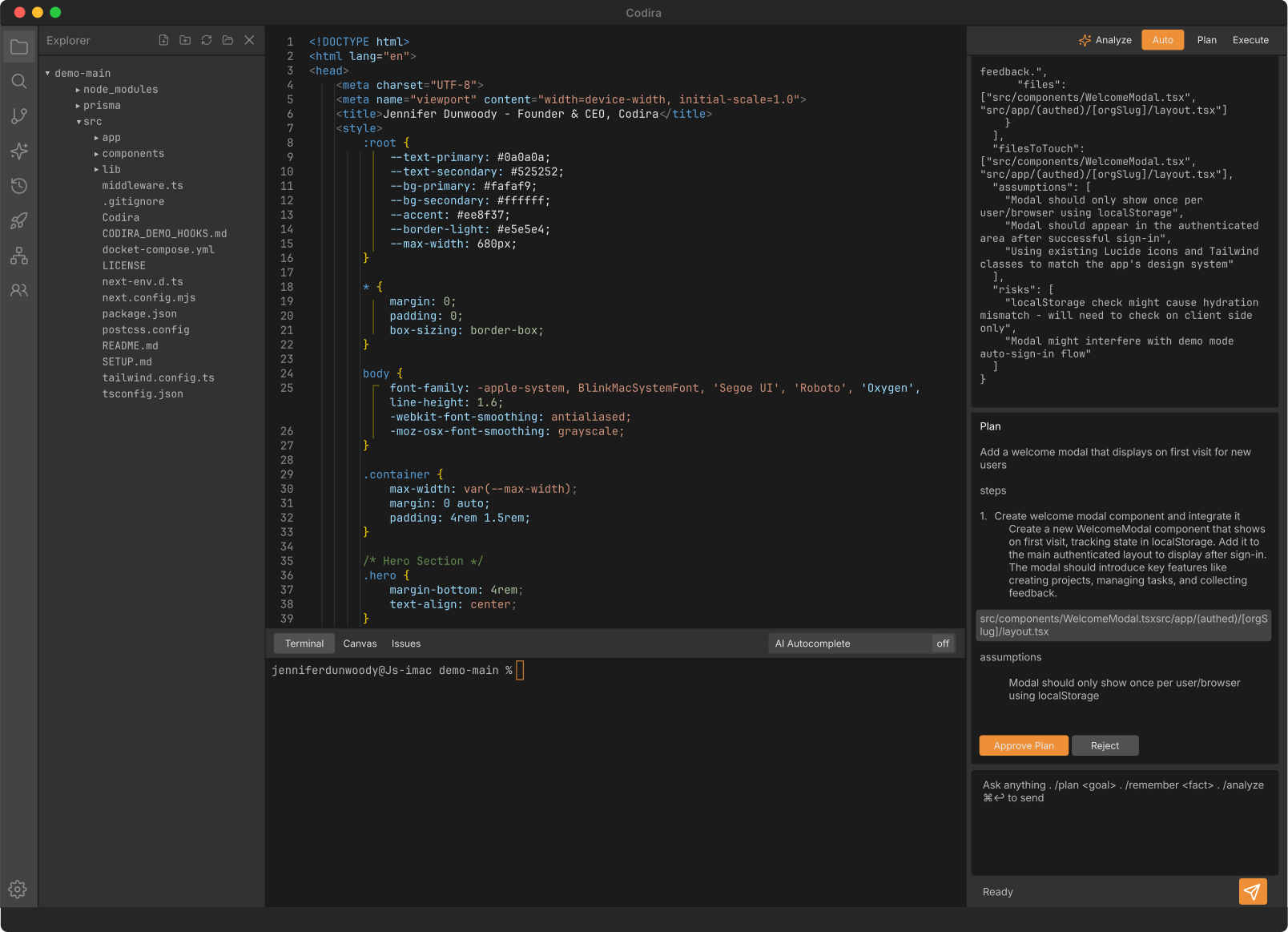
Getting Started
Install
- Download Codira from codira.com/download.
- macOS: open the DMG, drag
Codira.appto your Applications folder, then launch from Applications or Spotlight. - Windows: not available yet. Codira is macOS-only today; a signed Windows installer is in progress with no committed date.
macOS 11 Big Sur or later. The app is a universal binary, so it runs natively on both Apple Silicon and Intel Macs. Windows is not available yet.
First Launch
You'll see a three-step onboarding modal:
- Welcome — one-screen overview of how the agent team works.
- Sign in — sign in to Codira to get the agent team running on your credit wallet. Your 7-day Individual trial includes enough credits to try the first few /plan runs. If you'd rather use your own Anthropic / OpenAI keys, click Set up later in Settings — Codira lands in the workbench with a lockout that points you at
Settings → API Keysto paste keys, then unlocks. - Get started — final tips, then the workbench loads.
You can switch between hosted credits and BYO keys any time in Settings → API Keys. Both modes route through the same ten-agent loop.
Your First Project
Click Create New Project from the empty explorer panel. Pick a framework (Next.js recommended for first-timers — it's the default). Name your project. Click Create.
Codira spawns a terminal session, runs the framework's scaffold CLI, streams progress live in the wizard, and auto-opens the new folder as a workspace when package.json lands.
Your First ai Run
Four ways to invoke the agent team — each sized to the kind of change you’re making:
| Way | Best for |
|---|---|
| ⌘K | Composer — inline edits to one or two files with code selected |
/fix | Surgical single-file change from chat (skips Security + QA — fast) |
/plan | Multi-file features, multi-step builds, greenfield apps (full pipeline) |
| Chat panel free-form | Questions, brainstorming, /explain, /audit, /uat |
Try this: open any file, press ⌘K, type "add a 2-line docstring at the top explaining what this file does", hit ⌘↩. The agent team plans → writes → reviews → shows you a diff. Click Apply to write it; click Reject to discard.
How Codira Works
The Agent Team
Codira's secret isn't a smarter single model. It's a team of ten specialized agents, each with one job and a different vantage point. They hand off to each other so no single model has to be good at everything:
| Agent | Job | Powered by |
|---|---|---|
| Planner | Reads your goal + project context, designs a structured plan with file targets | Claude Opus 4.8 |
| Implementer | Writes the actual code patch per the plan — a tool-using agent that reads files on demand instead of working blind | Claude Opus 4.8 |
| Reviewer | Reads the plan + patch, flags correctness issues — the anti-hallucination gate | Claude Opus 4.8 |
| Security | Checks the patch for vulnerabilities, leaked secrets, unsafe patterns (scope-calibrated) | Claude Sonnet 4.6 |
| QA | Proposes tests the patch should have, optionally materializes them | Claude Sonnet 4.6 |
| Auditor | Read-only — finds bugs in existing code with file:line evidence | Claude Opus 4.8 |
| Verifier | Cross-checks the auditor's findings against the actual code; and, after a change, reads the real build/test output and renders an honest plain-English verdict | Claude Opus 4.8 |
| Explainer | Answers questions about your codebase — guided tours, targeted Q&A | Claude Opus 4.8 |
| Debugger | On test/UAT failure, analyzes root cause + proposes candidate fixes | Claude Opus 4.8 |
| UX Reviewer | Critiques the rendered preview against your project's design system | Claude Sonnet 4.6 (vision) |
Single-model IDEs ask one model to "do everything." That works for autocomplete but breaks at the shape of larger changes — the model invents files that don't exist, deletes code that wasn't related, can't explain what it just did.
Codira's team produces visibly better output on non-trivial tasks because each agent has one job and a different vantage point.
Settings → Models, and bring your own Anthropic or OpenAI keys to route the whole team through your own account.Project Comprehension
Before the agents touch a line, Codira needs to understand the project the way a teammate would. Run /understand once and Codira reads the whole repo and writes a durable, shared .codira/understanding.md that is injected into every agent on every run — so the Planner, Implementer, and Reviewer all work in your project's idiom instead of a generic one.
The doc is built on two tiers of trust, so it can never become a hallucination amplifier:
- Verified facts — parsed straight from disk: the real build/test commands, the project layout, the symbol → import map, and each test fixture's actual surface. Ground truth.
- Observed patterns — conventions the model infers, each of which a deterministic verifier then confirms against the code. Any claim the code contradicts is dropped before it's written.
The result is prompt-cached for speed, and a staleness fingerprint shows a click-to-refresh banner when the repo drifts far enough to warrant a re-read. On top of this, before the Implementer writes any step it's handed the exact symbols, imports, and fields that step references — parsed, not guessed — so it builds against what's really there.
Plan-First Workflow
Every Codira change starts with a plan. Even ⌘K edits go through Plan → Implementer.
A plan is structured JSON the Planner produces:
{
  "goal": "Add login form with email validation",
  "steps": [
    { "id": "s1", "title": "Add validation helper",
      "files": ["src/lib/validation.ts"] }
  ],
  "filesToTouch": ["src/lib/validation.ts", "src/components/LoginForm.tsx"],
  "assumptions": ["zod is already a dependency"],
  "risks": ["existing LoginForm may have its own validation already"]
}
You see the plan before anyone writes code. If the planner misread your intent or wants to touch the wrong files, you fix it cheaply at plan time instead of expensively after.
Patch Guards
Six deterministic safety nets fire on every patch the Implementer produces. They run automatically, never get tired, don’t care what the model “intended,” and they’re LLM-free — just parsers and diff analyzers in TypeScript, so their findings are ground truth the Reviewer treats as facts:
- PRESERVATION guard — Catches dropped exports. If the model was asked to “add a feature” but its patch silently removes the file’s existing named exports, that’s a flag. The classic “add became rewrite” failure mode.
- DEL guard — Catches unrelated deletions. If the model removes 50 lines from a file you didn’t mention, that’s a flag.
- GROUND guard — Catches hallucinated references. If the patch references
useAuthContext()but no such symbol exists in your codebase, that’s a flag. - REGEN guard — Catches wasteful rewrites. If the model rewrote 80% of a file to change one function, that’s a flag (advisory).
- STUB guard — Catches placeholder code that looks finished. Empty submit handlers, hardcoded fake data, no-op returns, lists that ignore their input and render “Event at {h}:00” for every hour — that’s a flag.
- UI-LINT guard — Flags design-system violations in UI patches — drop shadows, off-scale radii, AI-fingerprint gradients, accessibility gaps — before the Reviewer sees them.
Findings are surfaced as banners on the patch card. You see exactly what the guards caught. You decide whether to apply, reject, or send it back with critique.
Verified Execution
The patch guards catch static problems by reading the diff. Verified Execution proves the change actually runs. After the agents apply a patch, Codira runs a real build-and-test gate instead of trusting that generated code compiles:
- Install — if the patch added a dependency, Codira runs npm / pnpm / yarn / bun install (with your approval) first, so the build isn’t red just because a package is missing.
- Build — the project’s real compile command runs (e.g.
tsc --noEmit). Compile errors are fed back to the Implementer to heal, up to three rounds — including test-only type errors in the tests the agents just wrote. - Test — your test command fires if one is detected (
vitest,pytest, …). - UAT — a framework-agnostic smoke check renders the running app and captures console errors (see UAT Auto-Run).
Multi-step plans get the same treatment: each step is applied so the next one sees it on disk, a step that’s already satisfied is skipped instead of halting the chain, and the whole plan is build-and-test verified at the end. This is what “every change ships verified” means in practice.
Independent Verification — the Verifier
Here is the question every non-engineer who owns software actually wants answered: did the change really work, or am I just being told it did? The Verifier is the part of Codira built to answer that honestly — in plain English — and to leave a hard evidence trail your engineer can audit.
Every other stage reasons over the proposed code — the plan, the patch, the review. The deterministic gates then run the real build and test commands. The Verifier is the stage that reads reality: the change that actually landed on disk, plus the raw, unedited output of your project’s real build and test toolchain. It then writes a verdict for two readers at once — a plain-English summary for you, and the exact commands, output lines, and file paths for your engineer.
It returns one of four honest verdicts:
- Verified — the real toolchain ran and its output proves the change works. You can trust it.
- Failed — the output shows the change is genuinely broken. Don’t ship it.
- Unverified — the honest “we don’t know.” Nothing ran that could prove it (no test runner, a config gap, a missing tool). The code may well be fine — we just won’t claim a pass we didn’t earn.
- Suspected false-green — the most important verdict it produces. Something reported a pass, but the raw output contradicts it — for example a test suite that failed to even load reports “0 failed tests” while its tests never ran. The Verifier catches the green that’s lying.
In practice the Verifier runs automatically after the gates — on both single changes and full multi-step plans — and posts its verdict as a plain-English card right in the chat (“Independent verification — …”). When nothing ran that could prove a change, it says so plainly rather than inventing a pass. That’s the whole point: honest verification on the work, in language you can act on.
Time Machine
Every ai-applied change is a git checkpoint under refs/codira/cp/*. Open the Time Machine panel (clock icon in the activity bar) to see the timeline.
Each entry shows:
- The user goal that triggered the change
- A diff of what changed
- A one-click Revert button that restores the previous state atomically
Your manually-typed edits aren't checkpointed (your git history covers those). Only ai-driven changes get the Time Machine treatment — so "undoing ai" is always one click, never "let me figure out what to reset to."
Features
⌘K Composer
The headline feature. Press ⌘K anywhere in the editor.
A focused modal appears in the center of your editor. Type what you want changed. Hit ⌘↩ to run fast (Plan + Implementer) or ⇧↩ to run with full review (adds Reviewer + Security + QA).
The composer:
- Scopes intelligently — if you have text selected, the agent edits just that range (with surrounding context for imports/types). If nothing's selected, it sees the whole file.
- Streams live progress — you watch Planning → Writing → Reviewing happen in real time.
- Shows a diff — per-file collapsible diffs with side-by-side option. Patch guards render as banners above. Review verdicts (Reviewer / Security / QA) get one-line summaries.
- Recommends a verdict — an Apply Decision Pill rolls up every agent verdict and guard result into one call: Ready to apply, Apply with care, or Don’t apply yet — with the specific reasons listed. You always have the final say; the pill never disables Apply.
- One approval applies all changes — the agents may touch multiple files; clicking Apply writes them atomically and captures a Time Machine checkpoint.
- Rejects cleanly — esc closes, discards. Nothing has been written.
Multi-step builds, one step at a time
When your prompt needs more than a single edit, the Composer executes the whole plan — not just the first step. Each step shows its own diff and its own agent verdicts, and you stay in control of the pace:
- Apply & continue — applies the current step under its own Time Machine checkpoint, feeds what it just wrote into the next step (so steps stay coherent with each other), and advances.
- Apply all — auto-chains the remaining steps unattended. Every step is still verified and checkpointed individually; the chain stops on its own at any step that raises a blocking signal, so “unattended” never means “unchecked.”
- Stop — halts the build with every prior step already applied and checkpointed. Nothing is left half-written.
Single-step plans behave exactly as before — the multi-step machinery only appears when there’s more than one step to run.
Chat Panel
The right sidebar. Three modes:
- Auto — Codira picks the right model per call (cheap for chitchat, frontier for complex work)
- Claude — Forces Anthropic Claude as the responder; best for long-form reasoning, code reading, planning questions
- GPT — Forces OpenAI GPT-4o as the responder; best for code generation, fast turnaround on small edits
Slash commands
| Command | What it does |
|---|---|
/plan <goal> | Runs the full orchestrator end-to-end on a multi-file change (spec expansion → Planner → multi-step Implementer + 6 guards + Reviewer + Security + QA + UAT) |
/migrate <goal> | Coordinated codebase-wide refactor (e.g. “Pages Router → App Router”). Same orchestrator as /plan, primed to discover every affected file across the repo and end with a verify step. |
/fix <goal> | Surgical single-file change from chat. Skips Security + QA (overkill for small edits) but keeps all 6 guards + Reviewer. The right-sized tool for “fix this CSS” or “rename this variable.” |
/understand | Reads the whole repo once and writes a durable, shared .codira/understanding.md that’s injected into every agent — so the team works in your project’s idiom. Verified facts parsed from disk + observed patterns the model infers and a deterministic verifier confirms. See Project Comprehension. |
/explain | Codebase Q&A. Without args: 5-section guided tour (stack, architecture, entry points, conventions, suggested follow-ups). With a question (/explain where does auth live): targeted answer with file:line refs. |
/audit <scope> | Read-only bug hunt. Auditor finds issues with file:line evidence; Verifier cross-checks each finding against actual code (CONFIRMED / PARTIAL / REFUTED). Catches the false positives auditors generate. |
/uat <goal> | Run a smoke check against your live preview now (independent of any patch). Verdict + console + screenshot. |
/ux | Read-only design review of the running preview. The UX Reviewer agent critiques the rendered UI against your project’s design system + Team Standards. Advisory — no patches, no commits. |
/jira <KEY> | Work a Jira ticket the team already tracks. /jira PROJ-123 pulls the ticket and starts a plan against it; bare /jira lists your open tickets to pick from. On a clean apply, Codira transitions the ticket and comments the changed files. See Jira integration. |
/scope <text> | Tell the Security agent how to calibrate findings (local-only single-user app, production SaaS multi-tenant, etc.). Suppresses false positives for projects that don’t need full enterprise paranoia. |
/remember <fact> | Appends to .codira/MEMORY.md — read by every agent on every run. |
/standards | Opens (or creates) .codira/standards.md — your team’s house rules for code style, architecture, tests, and naming. Committed to the repo and layered into every agent’s prompt, so the whole team’s AI writes to one convention. |
/genesis | Opens Genesis — describe an app in a sentence and the full agent team designs its foundation (architecture brief, starter backlog, plan-ready blueprint). See Genesis. |
/brainstorm | Opens Brainstorm — a short architectural interview that writes an opinionated .codira/blueprint.md every later /plan and /fix reads. See Brainstorm. |
/analyze | Re-runs the project “first look” scan. Same as clicking the Analyze button in the ai panel header. |
hide to silence for the session.Free-form
Anything else is just a chat with the active provider. Ask questions, brainstorm, explain code, debug errors. No plan, no patches, no commits.
Sidekick — your guardian-angel coach
Not sure what to ask the agents, or whether your project is ready to ship? Open Sidekick from the wand icon in the activity bar. It’s a plain-English coach grounded in your actual project — it reads .codira/MEMORY.md, your Team Standards, and the live code, so it points at real files instead of guessing. Three modes:
- Prompt — Talk through what you want in normal language. Sidekick asks the clarifying questions a senior engineer would, then drafts a tight, specific
/plan. One click on Send to the agents hands it to the full verified pipeline. - Readiness — “Are we ready to ship or scale?” Pick a focus (overall, ship, scale, security, tests) and Sidekick returns a structured report: a one-line verdict plus per-area findings (Tests, Security, Scaling, Error Handling, …). Every gap comes with a concrete
/planprompt you can run on the spot. - Code Inspector — A read-only, plain-English audit of the whole project or just the active file. Findings are ranked by severity (critical → low), each citing the real files involved and a suggested
/fixprompt. Never writes code.
Genesis — Multi-Agent Project Foundation
Starting something new? Describe the app in a sentence or a paragraph and Genesis runs the full agent team to lay the foundation — before a single file is written.
Planner, Implementer, and Reviewer work the architecture in sequence; Security, QA, Auditor, and Verifier weigh in parallel; Debugger and Explainer close it out. Genesis synthesizes their output into three artifacts in your workspace:
.codira/genesis.md— a human-readable architecture brief (stack, data model, key decisions, risks)..codira/backlog.json— a starter backlog of stories and subtasks with dependencies..codira/blueprint.md— a plan-ready brief you can feed straight into/planto start building.
.codira/.Brainstorm — Architectural Interview
Run /brainstorm (or open it from chat) before you start building. Brainstorm walks you through a short, Socratic interview — about ten questions on who the app is for, expected scale, the data model, which surfaces you need (web / iOS / Android / desktop / API), team size, compliance, and what wins when trade-offs collide.
From your answers it writes a 1,200–2,000 word .codira/blueprint.md — an opinionated architecture brief that takes positions instead of hedging: what you’re building, the architecture verdict, the stack, the data model, service boundaries, compliance + security posture, what you’re explicitly not doing, and a three-month checkpoint.
/plan and /fix reads — so the whole agent team builds toward one coherent design instead of improvising per request. It’s the same .codira/blueprint.md Genesis produces, so the two are interchangeable starting points.Architect — Visual Stack & Schema Designer
Click the network icon in the activity bar. Full-screen modal opens.
Three tabs:
Stack
Drag-and-drop from a curated palette of ~50 tech tiles — frameworks, databases, ORMs, auth providers, payment processors, hosting platforms, more. Connect tiles to show dependencies. Each tile carries its install command and docs link.
Schema
Add entity nodes (User, Order, Product…). Edit fields inline with type dropdowns (string, int, datetime, uuid, json, etc.). Click chip toggles for primary key, unique, nullable. Drag from one entity's edge to another's to create relationships (1:1, 1:N, M:N — click the edge label to cycle).
Notes
Free-form architecture context. "Multi-tenant by user_id." "No MongoDB." "Targets p95 < 1.5s." Anything that helps the Planner make better decisions.
Why it matters
The Architect doc is saved to .codira/architect.json in your project (commit-friendly). On every /plan and ⌘K Composer run, the Planner reads it — so plans respect your stack choices and reference your real schema by name, instead of hallucinating tables or libraries.
Generate Files
The Schema tab has a Generate Files button (top-right) that turns your visual design into real code dropped into your project. Pick one of five formats + a target path:
- Prisma schema — Postgres datasource preconfigured, lands at
prisma/schema.prisma - SQL migration — Postgres CREATE TABLE DDL with FKs + join tables, topologically sorted
- Drizzle ORM — pg-core helpers, composite-PK M:N join tables, lands at
src/db/schema.ts - TypeScript types — plain
export interfaceper entity, no ORM, lands atsrc/types/schema.ts - Markdown docs — README-style table-per-entity format, lands at
docs/SCHEMA.md
The file lands as a pending patch card in chat — same review/apply/checkpoint flow the ai agents use. Re-generating against an existing file builds an update op with expectedBaseline so the preservation guard catches accidental schema regressions.
The original Copy as Prisma / SQL / Markdown clipboard buttons stay for when you just want to paste into an external tool.
Time Machine
Every checkpoint, every diff, every revert.
Browse the timeline (clock icon). Click any entry to expand and see the diff. Revert restores that exact pre-checkpoint state — your files revert, the checkpoint stays in history so you can re-revert (i.e. redo) later.
The Time Machine is project-scoped — each workspace has its own timeline.
Ship Panel
Click the rocket icon in the activity bar.
| Section | What it does |
|---|---|
| Repo | Init git, commit + push, create a GitHub repo, see remote URL |
| Deploy | One-click integrations: Vercel, Netlify, Render, Railway, Cloudflare. Connects your GitHub repo so deploys happen on every push. |
| Tools | Install missing CLIs (vercel CLI, GitHub CLI), check logged-in status |
The Deploy section opens the provider's "import this repo" URL in your browser pre-filled with your repo. You complete the connection on their site (one-time), then every git push from Codira ships a new build.
Tools section — fresh-machine setup
Codira shells out to gh (GitHub CLI) and vercel for the repo / deploy actions. On a fresh Mac neither is installed by default. The Tools section shows each one's state with an Install / Login button:
| State | Action button |
|---|---|
| gh — not installed | Install runs brew install gh in the integrated terminal (requires Homebrew) |
| gh — not authed | Login runs gh auth login --web → opens browser → you authorize → status flips to authed |
| gh — authed | Green dot, no action button |
| vercel — not installed | Install runs npm install -g vercel; falls back to sudo on system Node permissions |
gh creates repos under whichever account it's authed as — there's no way for Codira to push to an account you don't control. Run gh auth status in the terminal to confirm which account gh is using.
Auto-init git for non-repo workspaces
If you open a workspace that doesn't have a .git directory (e.g. a project you just unzipped or downloaded as a tarball), Codira auto-initializes git + makes a baseline commit ("Initial commit (Codira baseline)") the first time you run an action that needs a repo (Apply patch or Create GitHub repo). Idempotent — workspaces that already have .git + commits are left alone.
gh repo create --push would fail with "nothing to push" on freshly-unzipped projects. Auto-init means Create & Push works on a fresh Tessera demo / Next.js starter / etc. with zero terminal setup.Search Panel
Plain find-in-files across your workspace — the magnifying-glass icon in the activity bar. Type a query, results group by file with a one-line preview of each match, click any result to jump straight to the line in the editor.
Search is case-insensitive substring across every text file in the workspace tree (binary files, node_modules,.git, .next, dist, and other generated dirs are skipped automatically). Debounced ~200 ms, so it updates as you type without thrashing on large repos.
/plan + ⌘K) when you only know what the code does.Semantic Search
Codira indexes your project the first time you open it as a workspace. Files are embedded with OpenAI's text-embedding-3-small and cached locally at .codira/embeddings.json.
When you /plan or ⌘K, Codira queries the index for the top-3 files semantically relevant to your goal and includes them in the Planner's context. The Planner finds the right file by meaning, not by name — ask for "the file that handles user authentication" and it returns the right file even if it's named realme_common/auth/jwt.py.
Inline Completion
Optional ghost-text autocomplete. Toggle the ai Autocomplete pill at the right side of the bottom panel.
When on, GPT-4o-mini generates inline completions as you type. Press Tab to accept. Default off — many users prefer not to have suggestions interrupting their flow. Daily token cap of 200k prevents runaway usage.
Framework Freshness
Models are trained on a snapshot of the world, so left alone they’ll happily scaffold last year’s framework version — the classic “wrote Tauri 1 when you’re on Tauri 2” bug. Framework Freshness closes that gap.
Before the Planner and Implementer run, Codira scans your goal and plan for framework and library names (Next.js, React, Vite, Tauri, Tailwind, Prisma, FastAPI, Django, …) and resolves their current stable versions live from the registries — npm, crates.io, and PyPI — in parallel. Those exact versions are injected into the agents’ context as ground truth: use these versions and their current APIs, not your training data.
It never blocks: if a lookup fails the agent simply falls back to its own choice for that dependency. On by default; toggle under Settings → ai Models → Use current framework versions.
Multi-Language Support
Codira’s editor, agents, Time Machine, Architect, and Ship work on a project in any language. But the part that matters most — the verified execution that actually runs your build and tests and proves a change works — depends on Codira knowing your language’s real toolchain. So we’re honest about exactly how far that guarantee reaches, tier by tier:
| Tier | Languages | What you get |
|---|---|---|
| Validated | TypeScript / JavaScript | The full promise, proven end-to-end: build gate, test gate, self-heal, and independent verification. |
| Strong | Python | Real static-verification and test gates (ruff / pyright / pytest), virtualenv- and monorepo-aware. |
| Gated | Go, Java / Kotlin | A real build gate (go build; Maven / Gradle compile, wrapper-aware), test gate (go test; mvn / gradle test, monorepo-aware), and self-heal — each proven against a real toolchain. |
| Experimental | Everything else | The agents and editor still work; verified execution falls back to best-effort, and the Verifier will tell you plainly when a change couldn't be proven. |
Asset Import
Need an image in the project — a logo, an icon, a reference screenshot? Bring it in through the Explorer’s import action: an OS file dialog opens, and the file is copied into your project’s public/ folder with a web-safe filename. The agents stay strictly project-scoped throughout — they never roam your filesystem on their own.
When a diff references an image that isn’t in the project yet, Codira flags it with a one-click import to the path the code uses — so a generated <img src=…> never points at a file that doesn’t exist. Images you paste for the agents to look at (see Image-to-Code) are auto-downscaled before they’re sent.
Live Preview & Canvas
Bottom panel Canvas tab. Codira auto-detects your dev server (npm run dev, expo start, etc.) and the moment a URL resolves it pops the preview into its own window so it isn’t cramped inside the IDE. Already started the server yourself in the terminal? Canvas probes the framework’s port and attaches to it instead of spawning a duplicate.
Pick a device frame — desktop, iPhone, Android, or iPad — to preview responsive and mobile layouts at the right size (Codira defaults to a phone frame for Expo / React Native). For full Chrome DevTools, click Open in Browser. If the server won’t start, Preview Doctor diagnoses it with one-click fixes.
UAT Auto-Run (v0.9.6)
The 6 patch guards catch static failure modes (dropped exports, hallucinated imports, stubbed code). They can’t tell you whether the page actually renders. After v0.9.6, every successful Apply auto-runs an end-to-end smoke check against your live preview:
- Tests fire first (if a test command is detected —
npm test,pytest, etc.) - Then UAT fires against the preview iframe: navigate, wait for body, screenshot, capture console errors
- Pass → green verdict card, done
- Fail → the failure is formatted as critique and fed back to the Implementer for a retry, capped at 2 rounds. New patch surfaces as a regular pending card.
Always-on for v0.9.6 (rationale: prove the safety value before adding a knob). Settings toggle to disable comes in v0.9.6a. Skipped silently when no dev server is running.
You can also trigger a UAT manually with /uat <goal> (independent of any patch).
Debugger — “Explain failure” (v0.9.10)
When a test or UAT fails, you don’t have to read raw error tails or wait for the auto-retry to guess at a fix. Click Explain failure on the failed card — the Debugger agent (9th in the lineup) analyzes the failure and emits a structured DebugAnalysisCard:
- Root cause — 1-2 sentences on the underlying reason, not just the symptom
- Execution trace — numbered steps with file:line refs tracing how the failure happened
- 2-3 candidate fixes — each with name + description + honest tradeoff + an Apply this fix button
Click a fix → the Implementer runs with that fix’s critique as the directive → new pending patch through the 6-guard pipeline. Teaches you what broke and why, rather than silently retrying. Manual-trigger by design (saves the Debugger LLM call for failures the user actually wants to understand).
Visual Editor
Turn on Edit mode in the live preview and the preview becomes a canvas you edit by hand. Click any rendered element — a heading, a button, a card — and Codira selects it and opens an edit panel beside the preview. Change its text and its styles — color, size, weight, spacing — with direct controls, and the running preview updates as you type.
This is direct manipulation, not a prompt. You’re not describing a change and hoping the model lands it — you make the change yourself and see it immediately. When it looks right, click Save and Codira writes the edit back to your real source file on disk — a normal edit you can review in git, not something trapped inside a tool.
- Works on your real app, any framework — Vite + React, Next.js, or plain HTML. It edits the actual app you’re running, not a walled-garden sandbox, with nothing to install per project.
- Live feedback — edits apply to the preview instantly so you can dial in a value by eye before you commit it.
- Writes to source — Save lands the change in the file it came from, so the edit is versioned and reviewable like any other line you’d write.
In Edit mode, hovering the preview highlights the element under your cursor, so you always know exactly what a click will select. Numeric values are scrubbable — drag left or right across a size, spacing, or weight and it adjusts by feel while the preview moves with you, the way you’d nudge a value in a design tool.
This is the click-and-edit counterpart to the prompt-driven flow: use the Visual Editor when you know exactly what you want and want to just do it, and the ⌘K Composer or a /fix when the change is better described than dragged. For property nudges routed through the guarded agent pipeline, see UI Editor Quick Edits below.
Structural Edits (v1.4.0)
The Visual Editor also changes the structure of your layout, not just the styling on it. Select an element and delete it, or drag to reorder it among its siblings — the preview reflows and Save writes the new arrangement back to your source.
Structural edits are deterministic. Codira parses your JSX into an abstract syntax tree, applies the delete or reorder as a precise tree operation, and prints the code back — it never asks a model to guess at the rewrite. The change that lands in your file is exactly the one you made in the preview, and it reviews cleanly in git like any hand edit.
AI Visual Assist (v1.4.0)
When a change is easier to describe than to drag, Visual Assist puts a docked ai action row on the selected element: Edit · Move · Duplicate · Insert. Pick an action, type what you want in plain language, and Codira makes the change to your real source.
- Edit — restyle or rewrite the selected element from a prompt.
- Move — reposition it relative to the elements around it.
- Duplicate — clone it, then adjust the copy.
- Insert — add a new element next to the selection.
You can attach an image to a prompt — a logo, a photo, an icon. When you Insert an element built around an attached image, Codira saves the real asset into your project’s public/ folder and references it from there, so the file ships with your app instead of living as a throwaway data URL.
UI Editor Quick Edits (v0.9.7)
Click any element in the live preview with Edit UI mode on. The UI Editor panel opens with a new Quick edits section between the read-only computed styles and the free-form prompt textarea. Direct controls for the 7 most-edited properties:
- Padding / Margin / Font-size / Border-radius — px steppers (±4 nudge, type-in input)
- Font weight — button group (400 / 500 / 600 / 700)
- Text color + Background color — native color picker + hex input
Controls pre-fill from the element’s computed styles. Nudge one → “Apply N quick edits” button appears → opens Composer with a mechanical prompt (“set padding to 24px; set background color to #1e293b.”). The Implementer’s job becomes transcription, not invention — no ai-guessed values, just exact transcription into the right source file. Still goes through the full 6-guard + reviewer pipeline.
Free-form prompt textarea remains for harder asks (“make this feel premium”). Both Apply buttons coexist — use what fits the change.
Command Palette (v0.12.2)
Press ⌘P from anywhere in the IDE. Fuzzy file-open over the entire workspace — type any subsequence of the file name and the match list narrows live. ↑ / ↓ to navigate, ↵ to open, Esc to close. Sub-200ms cold walk on a 5k-file repo; capped at 10k files.
Rename Symbol (v0.12.12)
Press ⌘⇧R on a symbol in the editor — the Rename modal opens pre-filled with the selection or word at cursor. Type a new name; the preview list updates 350ms after you stop typing, showing every whole-word case-sensitive hit across the workspace, grouped by file.
Per-file checkboxes let you untick files you don’t want to touch. Old → new is rendered inline with a rose strike-through and an emerald insert so you can spot collisions before applying. ⌘↵ applies all selected files atomically (one-by-one, never half-written); any open editor tabs touched by the rename reload from disk.
Find & Replace (v0.12.4)
The Search panel (sidebar → magnifier) has three toggles next to the query input: Aa for case-sensitive, ab for whole-word, .* for full regex. Combine them as needed; invalid regex surfaces inline.
Open the Replace input below the search field. Replace All shows a confirmation toast with the count, then writes each file atomically. The result rows render the substitution inline before you commit — old → new on every match. Regex back-references ($1, $2, $&) work in the replacement string.
Git Blame in the Gutter (v0.12.13)
Click the Blame button (lower-right of the editor, over the scrollbar). Per-line authorship appears in the left margin as <author> · <age>; hover any line for the full commit popup (SHA, author, email, date, summary).
Codira layers the working-tree contents on top of the committed blame, so a line you just edited shows as Uncommitted rather than misattributing to whoever last touched that slot at HEAD. Per-tab toggle — flipping blame on for auth.ts doesn’t blast it across every open file. Results are cached per file × content shape, so toggling off and on is instant on an unchanged file.
Inline Git Diff (v0.12.5)
In the Source Control panel (sidebar), click any file row — a Monaco diff modal opens showing HEAD vs the working tree for that file. Esc closes. Untracked files skip the click (no HEAD to diff against). Binary files are refused with a clear message rather than rendering garbage.
Image-to-Code (v0.12.7)
Paste an image (⌘V) into the Composer — Figma frame, screenshot, mockup. The image attaches as a thumbnail strip above the prompt input. PNG / JPEG / WebP / GIF, up to 4MB each, up to 4 images per run.
When a run launches with image attachments, the planner auto-routes to a vision-capable model regardless of your normal Anthropic / OpenAI pick — and routes back to your normal model for follow-up text-only runs. The provider- specific multi-modal block construction (Anthropic image blocks, OpenAI image_url data URLs) is handled under the hood.
Schema Auto-Load (v0.12.0)
Open a workspace that contains any of:
prisma/schema.prisma— Prismasrc/db/schema.tsor similar — Drizzle- A
models.pywith SQLAlchemyBasesubclasses - A Django app with
models.pydefining model classes
— and the Architect schema canvas is populated automatically with the entities, fields, and relationships parsed from your source. No setup, no manual import.
A filesystem watcher fires drift toasts when the schema or package manifest changes after open, surfacing new tables / new dependencies that aren’t yet reflected on the canvas. Click the toast to merge them in.
Sync to Source — Prisma Reverse-Sync (v0.12.14)
Architect schema canvas → top-right toolbar → Sync to source button. Reads your existing prisma/schema.prisma, splices canvas-derived model blocks in place over the matching source blocks, appends new entities at the end, drops entities the user removed from the canvas. Everything else — datasource, generator, enums, comments, blank lines between blocks — passes through verbatim.
dropped entries explicitly with a warning toast before the patch lands, and the patch routes through the standard checkpoint flow so one-click revert is always available.Drizzle / SQLAlchemy / Django reverse-sync are not in this cut — each needs its own splicer + emitter pair. Use Generate Files (see Architect) for those ORMs in the meantime.
@web in Chat (v0.12.11)
Type @web <query> at the start of any chat message — Codira runs a DuckDuckGo search server-side (Rust + reqwest, no API key required), posts the top results as a card in the chat, and folds the same hits into the planner’s context block for that run.
Two-clause form for explicit separation: @web rust audio crate without alsa dep; build me a simple sample player. The first clause is what gets searched; the second is the planner’s actual goal, with the search results visible as context.
The directive is user-explicit by design — no silent tool- calls from the Planner. You see what was searched and what was found before the agents start thinking.
UX Reviewer — /ux (v0.13.0)
A vision-based design review of the rendered preview. Run /ux (or let it run as part of a UI change) and the UX Reviewer agent looks at the live preview the way a person would — then critiques it against your project’s design system and your .codira/standards.md Team Standards. Spacing rhythm, type scale, contrast, hierarchy, the AI-generated “default look.”
The UX Reviewer is advisory — its findings are suggestions, never blockers, and you can toggle the agent on or off in Settings → Agents. The deterministic UI-lint guard is the always-on counterpart: it runs automatically on every UI patch and surfaces hard design-system violations before the Reviewer sees them.
Preview Doctor (v0.14.x)
Starting the dev-server preview used to fail silently when a dependency was missing or a port was busy. Preview Doctor runs a preflight first: it installs any missing dependencies with one click via the detected package manager, and frees a port that’s already in use.
If the server still fails to come up, the Doctor reads the logs and turns them into one-click fixes:
- command-not-found → install the missing tool
- port in use → free the port
- OpenSSL / Node error → retry with the legacy provider flag
frontend/, apps/*, etc.) — not just the workspace root.Jira integration — /jira (v0.15)
Codira works the tickets your team already tracks in Jira — there’s no project board to learn or migrate to. Connect once, then point the agents at a ticket and they plan and build against it.
Connect in Settings → Jira: your site URL (https://acme.atlassian.net), account email, and an Atlassian API token. The token is stored in your macOS Keychain — never in a file. Hit Test connection to confirm.
/jira PROJ-123— pulls the ticket (summary + description) and starts a full plan against it./jira— lists your open tickets so you can pick one to work, no key needed.
When you apply a plan that came from a ticket, Codira writes back: it transitions the ticket (In Progress on pickup → In Review on apply — both configurable) and posts a comment listing the files it changed. Turn write-back off to keep Jira strictly read-only.
Design Token Engine
Design is a top-level tool in Codira — the pen-nib icon in the left rail. It gives your project a real design system: a single source of tokens (colors, type, spacing, radii) that both you and the agents work from, so what the ai builds actually matches how you want the app to look.
Capture from a URL (v1.4.0)
Paste a URL — say stripe.com — and Codira reads the live site and derives a design system from it: a set of design tokens, a live preview of the captured look, and a DESIGN.md guide that describes the system in words.
The agents read that DESIGN.md when they build, so new work comes out on-system instead of defaulting to the generic ai look. Capture the aesthetic you want once, and every run after it has a reference to follow.
Editable Token Mirror (v1.4.0)
The Design tool mirrors your project’s current tokens so you can view and edit them in one place. Change a color, a font, a spacing step — and Codira writes the edit back deterministically to wherever that token actually lives in your source of truth: your tailwind.config, your CSS variables, or a Tailwind v4 @theme block.
The mirror and your source stay in lockstep — there’s no separate copy to drift out of date, and every edit is a normal change you can review in git.
Apply to a Project (v1.4.0)
Captured a system you like? Apply adopts it into your codebase. Codira updates (or creates) your tokens to match, then reskins the hardcoded colors already sitting in your source so the app actually restyles — not just the token file. It rewrites:
- Hex colors (
#1e293b) - Tailwind palette classes (
bg-gray-800,text-slate-500) rgb()andhsl()values- Named CSS colors (
slategray)
Account & Billing
Plans
| Plan | Price | What you get |
|---|---|---|
| Hobby | Free | No card required. Limited agent requests and inline (tab) completions on base models — enough to try the workflow. |
| Individual | Core $20 · Core+ $60 · Ultra $200 /mo | Frontier models (Claude Opus, GPT-4.1, o3), all 10 verified agents, Genesis + Sidekick + the live Canvas preview, framework-agnostic UAT, MCPs/skills/hooks, unlimited Architect, 30-day Time Machine, automatic credit top-up. Sub-tiers differ by monthly credits, not features (4,000 / 14,000 / 50,000). |
| Teams | Team $40 · Organization $80 /seat/mo | Everything in Individual, per seat, plus centralized billing + admin, shared team memory + agent presets, usage analytics, team-wide privacy mode, SAML/OIDC SSO, audit logs, priority support. Credits 8,000 / 20,000 per seat. |
| Enterprise | Custom | Everything in Teams, plus pooled usage, invoice/PO billing, SCIM seat management, repo/model/MCP access controls, service accounts, an AI code-tracking API, and dedicated support. |
Every new account starts with a 7-day Individual trial — full frontier-model access, no card, plus a starter credit grant for the hosted gateway. When the trial ends, keep going on Hobby (free, limited agent requests on base models) or pick a paid plan to keep the frontier agents and full credits flowing. Either way your projects, Architect docs, and Time Machine history stay exactly where they are. Prefer to run on your own keys? BYO is included on every paid plan.
Credits
Codira uses credits as the unit of ai work. 1 credit = $0.01 retail.
Each ai run costs credits based on:
- Which model ran (frontier = more)
- How many input + output tokens
- Whether prompt cache was hit (cheaper)
Typical costs:
| Run type | Approximate cost |
|---|---|
| Simple chat turn | 1–3 credits |
| ⌘K Composer fast | 5–15 credits |
| ⌘K Composer full review | 20–60 credits |
/plan with 3-file change | 30–80 credits |
| Heavy refactor across 10 files | 100–300 credits |
Monthly bundled credits scale with your sub-tier: Individual 4,000 / 14,000 / 50,000 (Core / Core+ / Ultra); Teams 8,000 / 20,000 per seat (Team / Organization). Every run debits credits from your wallet — so you always see usage and we can throttle abuse — and you can buy top-up packs anytime. BYO keys bypass credits entirely.
Wallet
Open Settings → Account → Credits. You see:
- Current balance
- Lifetime purchased / used
- Last 5 transactions
Updates flow live via SSE — buy credits in your browser, watch the IDE wallet tick up in real time. Run an agent, watch it tick down.
Auto-topup
Settings → Account → Credits → Auto-topup section.
- Enable — toggle on
- Threshold — buy more when balance drops below this (default 500)
- Pack — which pack to buy (Starter $20 / Growth $50 / Scale $100 / Power $250)
Codira charges your default card on file (Stripe). Last-attempt status shows succeeded/failed with the Stripe error if anything went wrong.
Bring Your Own Keys
If you'd rather pay Anthropic/OpenAI directly:
- Get keys from console.anthropic.com and platform.openai.com
- Paste in
Settings → API Keys
When a BYO key is set for a provider, Codira routes that provider's calls directly (no Codira gateway, no credits debited). The Current Routing card in the same tab shows per-provider status:
- 🟢 direct to OpenAI (your key, no debit) — BYO active
- 🔵 via Codira (debits your wallet) — hosted gateway
- 🟡 not ready — paste a key or sign in — neither
You can BYO one provider and use the gateway for the other. Mix freely.
Buying Credits
Open Settings → Account → Credits → Buy credits ↗ to launch the dashboard in your browser. Pick a pack, pay via Stripe Checkout. Your wallet updates in the IDE the moment you return.
Settings
Themes
Settings → Theme.
- Dark (default) — Photoshop-inspired medium-gray chrome with a dark editor body
- Light — Inverted palette; white editor, light-gray panels
- System — Follows macOS Appearance, including live-flips when you change it in System Settings
Monaco's syntax theme swaps to match.
API Keys
Already covered above. Same tab also shows the Current Routing card — useful for confirming what's billing.
ai Models
Settings → Models. Pick the exact model each provider uses by default. Out of the box the agent team routes per slot to the model best-fit for the job — Claude Opus 4.8 for the quality-critical Planner, Implementer, and Reviewer; Claude Sonnet 4.6 for the focused Security, QA, and UX scans. You can override any slot, and the chat panel’s Auto / Claude / GPT toggle lets you force a provider per message.
| Provider | Available models |
|---|---|
| Anthropic | Claude Opus 4.8 · Claude Sonnet 4.6 · Claude Haiku 4.5 |
| OpenAI | GPT-4o · GPT-4.1 · GPT-4o mini · o3 · o4 mini |
Changes take effect on the very next message — no restart. If a provider retires a dated model id, Codira automatically falls through to that provider’s current default instead of erroring. Prefer to bring your own keys? Set them in Settings → API Keys and the whole team routes through your own Anthropic / OpenAI account.
Env Vars — per workspace, in the Keychain (v0.12.8)
Settings → Env Vars. Per-workspace KEY=VALUE pairs stored in the macOS Keychain (via the keyring crate, apple-native backend) — never in settings.json. Add a key, paste a value, save; the value lives in the Keychain item for this workspace and is materialized to .env.local at the workspace root on save.
.env.local is wrapped in managed-block markers (# >>> codira-managed env vars >>> and the matching close marker) so your hand-edited content above or below the block is preserved. Codira also adds .env.local to .gitignore on first write if it isn’t already ignored.
Values are lazy-revealed in the UI — click the eye icon to show, hides again after you click elsewhere. Vite, Next, Remix, and SvelteKit all pick up .env.local automatically; no extra wiring needed.
This Project — per-workspace overrides (v0.12.15)
Settings → This Project. Per-workspace overrides for the team-coordination fields (models + agentRouting) stored in .codira/settings.json. Commit the file to your repo and every teammate’s IDE (plus any CI run) uses the same per-project routing.
The tab shows two per-provider dropdowns (Anthropic, OpenAI) with an empty “Use global default” option. Pick an override on change and Codira writes the file atomically; pretty-printed JSON so it reads cleanly in a PR. A read-only preview at the bottom shows exactly what’s on disk.
Per-slot agent routing pinnings (e.g. pin Planner to Opus for this repo) are read + enforced today; the visual editor for per-slot edits is a follow-up — hand-edit .codira/settings.json directly:
{
  "version": 1,
  "models": { "anthropic": "claude-3-7-sonnet-20250219" },
  "agentRouting": {
    "planner": { "provider": "anthropic", "model": "claude-opus-4-20250514" }
  }
}
Crash Reporting
Settings → About → "Send anonymous crash reports."
Default on. What we collect:
- Stack traces
- IDE version + OS
- Anonymous user id (random, persisted locally, can't be reversed)
What we never see:
- Your code
- Your chat messages
- Your API keys
- File paths beyond the basename (
/Users/jane/secret-project/auth.ts→<redacted>/auth.ts)
Toggle off any time. Takes effect on next launch.
Privacy Policy
Full text at codira.com/privacy.
Keyboard Shortcuts
| Shortcut | Action |
|---|---|
| ⌘K | Open Composer |
| ⌘P | Open Command Palette — fuzzy file-open |
| ⌘⇧R | Open Rename Symbol modal (workspace-wide) |
| ⌘↩ | Run fast (Plan + Implementer) in Composer |
| ⇧↩ | Run with full review (Plan + Implementer + Reviewer + Security + QA) |
| ⌘↩ | Apply patch (on diff view) / Apply rename (in Rename modal) |
| ⌘, | Settings |
| ⌘B | Toggle side panel |
| ⌘S | Save active file |
| ⌘⇧W | Close folder |
| Esc | Close current modal |
Project Files
Codira keeps a few files inside your workspace at .codira/:
| File | What it is | Commit? |
|---|---|---|
MEMORY.md | Free-form project notes the Planner reads on every run | ✅ |
understanding.md | Project Comprehension doc from /understand — verified facts + confirmed patterns, injected into every agent | ✅ |
blueprint.md | Opinionated architecture brief from Brainstorm / Genesis — top-priority context for every /plan + /fix | ✅ |
architect.json | Your Stack + Schema from the Architect modal | ✅ |
settings.json | Per-project model picks + agent routing (v0.12.15) | ✅ |
standards.md | Team Standards file — every agent reads it on every run | ✅ |
baseline.json | Auto-learned codebase conventions cache | ❌ (auto-gitignored) |
embeddings.json | Cached semantic-search index | ❌ (gitignore'd by default) |
Edit MEMORY.md, architect.json, settings.json, and standards.md by hand if you prefer — Codira tolerates manual edits and reloads them automatically.
Troubleshooting
I can't sign in — "invalid_client" error
Email support@codira.com. Your OAuth client may not be properly registered on your account.
"Sign in to start using Codira" modal blocks the whole UI
You finished onboarding without picking an auth path (no sign-in, no BYO key). The lockout fires because the agent team can't make ai calls without one. Two options:
- Sign in with Codira — primary CTA. Opens your browser, signs you in, the lockout dismisses.
- I'll use my own API keys → opens
Settings → API Keys. Paste an Anthropic or OpenAI key (or both); the lockout dismisses the moment a valid key is set.
Your files and projects are untouched while the lockout is up — it only blocks ai features. The editor, terminal, git, and Time Machine all keep working.
My wallet shows 0 but I just bought credits
Click the ⟳ refresh button next to your balance in Settings → Account. Or quit + reopen Codira (forces the SSE channel to reconnect).
Composer is unusable / hangs forever
- Press Esc or click Stop to bail out
- Check that you have credits (if signed in) or BYO keys (if not)
- Try again with a simpler prompt
If a specific kind of prompt always hangs, email support with the prompt — likely a model issue we can route around.
Semantic search "failed: 401 Incorrect API key"
Your stored API key is invalid. Open Settings → API Keys → Clear on the affected provider. The IDE falls back to .env keys (if running from source) or to the hosted gateway (if signed in).
"Module not found" or syntax errors highlighted in valid code
Codira's editor doesn't run a full TypeScript language server against your project. Module imports show no errors (we disabled semantic validation to avoid noise). Syntax errors DO surface. If you need full type checking, run npm run typecheck in the integrated terminal.
Scaffold wizard says "Success!" but is stuck
Should be fixed in v0.5.1+. If you hit it on an older build, click Stop, then in the terminal panel run:
cd /Users/you/Projects        # or wherever you tried to scaffold
ls                            # confirm the project folder exists with package.json
Then open the folder manually via File → Open Folder.
Privacy & Security
What we collect
- Anonymous crash reports (opt-out in
Settings → About): stack traces with redacted file paths, IDE version, OS version, anonymous user id. - Subscription / billing data: through Stripe. Codira sees enough to validate your subscription and meter usage; Stripe handles cards.
- Usage telemetry: which features were used, anonymized. Aggregate-only — we don't tie events to individual users.
What we never see
- Your code. Even when using the hosted gateway, requests pass through unchanged — we don't log, store, or analyze the bodies. The gateway is a thin authenticating proxy.
- Your chat messages. Same as above.
- Your API keys in BYO mode. Those stay on your machine in the macOS Keychain — never in a settings file and never in your repo.
- Your project file contents. Indexed locally only; embeddings live at
.codira/embeddings.jsonin your workspace.
Where your data lives
| Location | What |
|---|---|
~/Library/Application Support/dev.codira.ide/settings.json | Preferences and model picks (mode 0600). No secrets — BYO API keys and OAuth refresh tokens live in the macOS Keychain. |
~/Library/Application Support/dev.codira.ide/conversations/*.json | Chat history per workspace |
<your-project>/.codira/MEMORY.md | Project memory |
<your-project>/.codira/architect.json | Architect Stack + Schema |
<your-project>/.codira/embeddings.json | Semantic search cache |
Code signing
Beta status: Codira v0.5.x is ad-hoc signed (Tauri's signingIdentity: "-") and not yet notarized with an Apple Developer ID. That means on first launch, macOS Gatekeeper will show a "Codira is from an unidentified developer" dialog.
To bypass on first launch:
- Right-click
Codira.appin Applications → Open - Click Open in the dialog that appears
- If that doesn't work:
xattr -cr /Applications/Codira.appin Terminal to strip the quarantine attribute
Subsequent launches don't require the right-click — Gatekeeper remembers your first-time approval. Apple Developer notarization is on the v0.6 roadmap (one-time $99/yr Apple cert setup); once shipped, the unidentified-developer dialog goes away entirely.
Frequently Asked Questions
Is Codira open source?
Codira's core is closed-source. Some adjacent tooling (the ai agent prompt templates, the Architect tile registry) may be open-sourced in the future. The credits + hosted gateway is closed by necessity.
Why does Codira need OAuth?
To verify your subscription, access your credits wallet, and bill correctly for ai runs. Sign-in is required for paid features.
Can I use Codira without signing in?
Yes — on any paid plan (or during your trial), paste your own Anthropic or OpenAI API key in Settings → API Keys. The agent team then runs against your keys directly and bypasses the hosted gateway and credits entirely — you pay the provider directly. (The managed credit wallet is the simpler path for most users; BYO is there when you'd rather bring your own.)
Does Codira upload my code anywhere?
Only to the ai provider you're using (Anthropic or OpenAI), when you run an agent. We don't proxy, store, or log code on Codira's servers — even when using the hosted gateway, request bodies pass through unmodified.
Can I switch between BYO and hosted gateway?
Yes — at any time, per provider. Set a BYO key in Settings → API Keys → that provider routes direct. Clear it → that provider routes via Codira's gateway (if signed in). Mix and match.
What happens if Codira goes down?
If you're in BYO mode: nothing — Codira talks directly to the ai providers. If you're using the hosted gateway: ai features pause until codira.com is back. Your code is unaffected.
How do I export my Architect design?
Architect → Schema tab → Copy as Prisma / SQL / Markdown in the toolbar.
How do I revert a change Codira's ai made?
Time Machine panel (clock icon) → find the entry → Revert.
Does Codira support [other framework]?
Scaffolder ships with Next.js, Vite + React, Expo, SvelteKit, Astro, and Remix. The Architect tile registry covers 50+ tools including Vue, Hono, FastAPI, Tauri, more. Frameworks not in the scaffolder still work — open an existing folder of any framework as a workspace.
Does Codira support Python / Go / Java / Rust projects?
Open a project in any language and the editor, ai agents, Time Machine, Architect, and Ship all work. What varies is how far the verified execution guarantee reaches: TypeScript / JavaScript is fully validated, Python is strong (real ruff / pyright / pytest gates), Go and Java / Kotlin are gated (real build + test + self-heal), and everything else is experimental — with the Verifier telling you plainly when a change couldn’t be proven. See Multi-Language Support. (The new-project Scaffolder is still JS/TS only — Next.js, Expo, etc. — but you can open an existing project of any language as a workspace.)
Can I run Codira on Windows / Linux?
Not yet. Codira is macOS-only today — the app is a universal binary, so it runs natively on both Apple Silicon and Intel Macs from one download. A signed Windows installer is in progress but has no committed date, and Linux is a roadmap item with no timeline.
How do I uninstall?
- Quit Codira (⌘Q)
- Drag
/Applications/Codira.appto Trash - Optional:
rm -rf ~/Library/Application\ Support/dev.codira.ideto clear settings + chat history
How do I get support?
Email support@codira.com. Include:
- Codira version (
Settings → About) - macOS version
- A reproduction of the issue if possible
- The error toast / message text
For billing / subscription / wallet issues, mention "billing" in the subject — those route to a different queue.
Quick Reference Card
Print this. Stick it next to your monitor.
⌘K           Composer
⌘↩           Run fast (Composer) / Apply (diff view)
⇧↩           Run with full review (Composer)
⌘,           Settings
⌘B           Toggle side panel
⌘S           Save
⌘⇧W          Close folder
Esc          Close modal

/plan <goal>          Multi-file plan + review + apply
/remember <fact>      Append to .codira/MEMORY.md
/analyze              Re-run the project first-look scan

Activity bar (left, top to bottom):
  Folder      Explorer
  Search      Find in files (ripgrep-style)
  Branch      Source Control
  Sparkles    Agents (toggle Reviewer / Security / QA)
  Clock       Time Machine (checkpoints + revert)
  Rocket      Ship (commit, push, deploy)
  Network     Architect (Stack + Schema designer)
  Gear        Settings
Download the IDE and ship your first ai-reviewed change.
7-day Individual trial with starter credits, or paste your own keys. No card. macOS only today.
 Download for macOS